
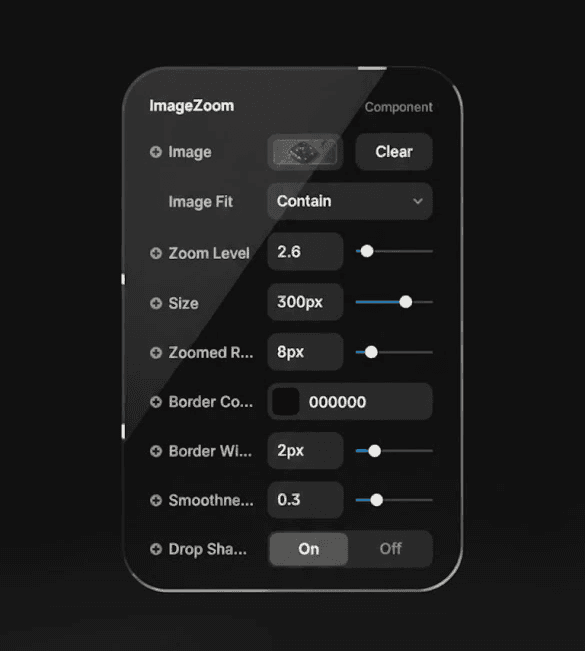
An interactive image zoom component that reveals a magnified pop-out window on hover. Fully customizable with smooth motion, zoom levels, border styling, and shadow controls. Perfect for product previews, galleries, and detailed image inspections.
An interactive image zoom component that reveals a magnified pop-out window on hover. Fully customizable with smooth motion, zoom levels, border styling, and shadow controls. Perfect for product previews, galleries, and detailed image inspections.
An interactive image zoom component that reveals a magnified pop-out window on hover. Fully customizable with smooth motion, zoom levels, border styling, and shadow controls. Perfect for product previews, galleries, and detailed image inspections.
Product Description
Product Description
The Image Zoom Popout is a high-quality interactive image component for Framer that displays a smooth, magnified zoom window when users hover over an image. Designed for product-focused websites, portfolios, and detail-heavy layouts, it allows visitors to explore images more closely without leaving the page.
You can fully control the zoom strength, popout size, border styling, corner radius, shadow, and image fit mode. The zoom window dynamically follows the cursor and adapts intelligently near the edges for a seamless experience. Whether you’re showcasing products, artwork, or detailed visuals, this component adds a premium, interactive touch to your designs.
The Image Zoom Popout is a high-quality interactive image component for Framer that displays a smooth, magnified zoom window when users hover over an image. Designed for product-focused websites, portfolios, and detail-heavy layouts, it allows visitors to explore images more closely without leaving the page.
You can fully control the zoom strength, popout size, border styling, corner radius, shadow, and image fit mode. The zoom window dynamically follows the cursor and adapts intelligently near the edges for a seamless experience. Whether you’re showcasing products, artwork, or detailed visuals, this component adds a premium, interactive touch to your designs.
Key Features
Interactive Hover Zoom — Displays a magnified pop-out view when users hover over the image.
Adjustable Zoom Level — Control how powerful the zoom effect feels.
Custom Popout Size — Set the exact size of the zoom window.
Dynamic Cursor Tracking — The zoom follows the user’s cursor in real time.
Image Fit Controls — Choose between cover, contain, fill, or none.
Border & Radius Control — Fully customizable border color, width, and rounded corners.
Optional Drop Shadow — Add depth with a realistic shadow effect.
Smooth Motion Animation — Clean scale and fade animation on hover.
Edge-Aware Positioning — Smart placement near edges for better visibility.
Fully Responsive — Works in any fixed layout and adapts cleanly to design frames.
Key Features
Interactive Hover Zoom — Displays a magnified pop-out view when users hover over the image.
Adjustable Zoom Level — Control how powerful the zoom effect feels.
Custom Popout Size — Set the exact size of the zoom window.
Dynamic Cursor Tracking — The zoom follows the user’s cursor in real time.
Image Fit Controls — Choose between cover, contain, fill, or none.
Border & Radius Control — Fully customizable border color, width, and rounded corners.
Optional Drop Shadow — Add depth with a realistic shadow effect.
Smooth Motion Animation — Clean scale and fade animation on hover.
Edge-Aware Positioning — Smart placement near edges for better visibility.
Fully Responsive — Works in any fixed layout and adapts cleanly to design frames.
Usage Ideas
Product detail pages
E-commerce image previews
App UI mockups
Portfolio image inspections
Fashion & lifestyle product showcases
High-detail digital artwork galleries
Usage Ideas
Product detail pages
E-commerce image previews
App UI mockups
Portfolio image inspections
Fashion & lifestyle product showcases
High-detail digital artwork galleries
Refund Policy
All sales are final due to the nature of digital products. Please review all details before purchasing.
Refund Policy
All sales are final due to the nature of digital products. Please review all details before purchasing.
Questions & Support
Free lifetime updates & email support.
Questions? Reach out via email integrystudio@gmail.com or on LinkedIn.
Questions & Support
Free lifetime updates & email support.
Questions? Reach out via email integrystudio@gmail.com or on LinkedIn.
Don’t have an account?