A smooth, premium custom cursor for Framer with hover expansion, invert blend mode, and ultra-fluid animation.
A smooth, premium custom cursor for Framer with hover expansion, invert blend mode, and ultra-fluid animation.
A smooth, premium custom cursor for Framer with hover expansion, invert blend mode, and ultra-fluid animation.
Product Description
Product Description
Premium Circle Cursor is a high-performance custom cursor component built specifically for Framer. It replaces the default system cursor with a smooth animated dot and ring that dynamically reacts to hover interactions across your website. When hovering over buttons, links, forms, or interactive elements, the cursor expands into a soft filled circle for a polished, high-end experience seen on modern award-winning websites.
Premium Circle Cursor is a high-performance custom cursor component built specifically for Framer. It replaces the default system cursor with a smooth animated dot and ring that dynamically reacts to hover interactions across your website. When hovering over buttons, links, forms, or interactive elements, the cursor expands into a soft filled circle for a polished, high-end experience seen on modern award-winning websites.
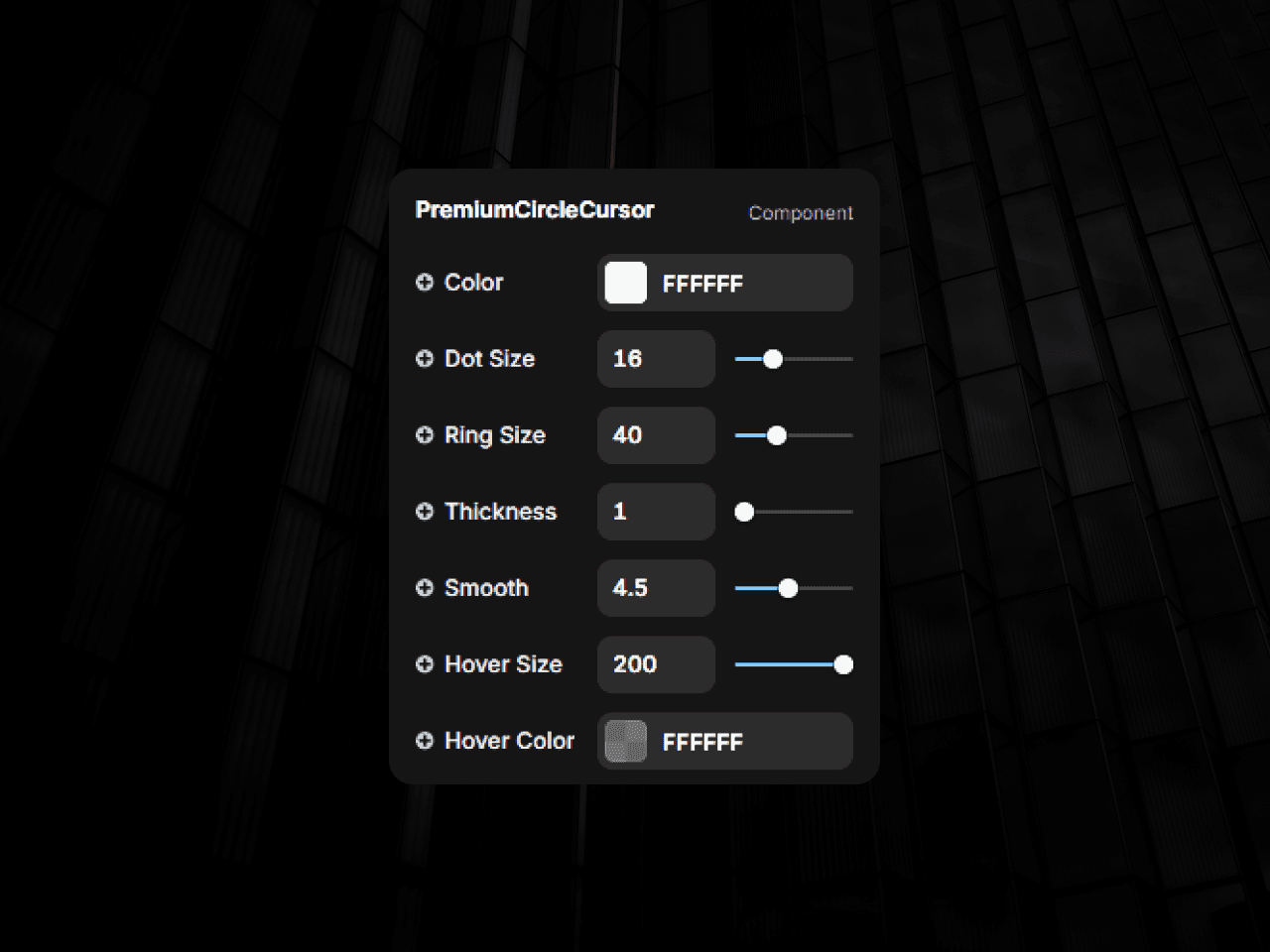
The cursor movement is powered by natural spring physics for ultra-smooth motion, while the optional invert blend mode allows the cursor to automatically adapt its visibility on both light and dark backgrounds. Every part of the cursor is fully customizable directly from Framer controls, including size, color, hover size, thickness, smoothness, and hover fill.
This component is optimized for performance, works across all modern browsers, and does not interfere with your site’s native layout or interactions.
The cursor movement is powered by natural spring physics for ultra-smooth motion, while the optional invert blend mode allows the cursor to automatically adapt its visibility on both light and dark backgrounds. Every part of the cursor is fully customizable directly from Framer controls, including size, color, hover size, thickness, smoothness, and hover fill.
This component is optimized for performance, works across all modern browsers, and does not interfere with your site’s native layout or interactions.
Perfect for portfolios, agencies, SaaS landing pages, personal brands, creative studios, and experimental web experiences.
Perfect for portfolios, agencies, SaaS landing pages, personal brands, creative studios, and experimental web experiences.
Key Features
Smooth animated dot + outer ring cursor
Optional invert blend mode (light/dark auto contrast)
Fully customizable:
Cursor color
Dot size
Ring size
Ring thickness
Hover size
Hover fill color
Smoothness level
Magnetic-style delayed ring follow
Auto detects clickable elements
Zero layout disruption
Ultra-lightweight & optimized
Works only in Preview/Live mode (not in editor)
Key Features
Smooth animated dot + outer ring cursor
Optional invert blend mode (light/dark auto contrast)
Fully customizable:
Cursor color
Dot size
Ring size
Ring thickness
Hover size
Hover fill color
Smoothness level
Magnetic-style delayed ring follow
Auto detects clickable elements
Zero layout disruption
Ultra-lightweight & optimized
Works only in Preview/Live mode (not in editor)
Usage Ideas
Portfolio websites
Creative agencies
SaaS landing pages
Startup hero sections
Personal brands
Experimental UI websites
Usage Ideas
Portfolio websites
Creative agencies
SaaS landing pages
Startup hero sections
Personal brands
Experimental UI websites
What’s Included
Fully working Framer Code Component
Ready-to-use property controls
Live hover detection
Invert blend mode toggle
Editor-safe preview mode
What’s Included
Fully working Framer Code Component
Ready-to-use property controls
Live hover detection
Invert blend mode toggle
Editor-safe preview mode
How to Use
Add a Code Component in Framer
Paste the provided cursor code
Drop the component anywhere on your page
Move the component out of the canvas.
Customize color, size, hover behavior from the right panel
Preview your site — the cursor activates automatically
That’s it. No extra setup required.
How to Use
Add a Code Component in Framer
Paste the provided cursor code
Drop the component anywhere on your page
Move the component out of the canvas.
Customize color, size, hover behavior from the right panel
Preview your site — the cursor activates automatically
That’s it. No extra setup required.
Customization Options (From Controls)
Cursor Color
Invert Mode On/Off
Dot Size
Ring Size
Ring Thickness
Hover Expansion Size
Hover Fill Color
Movement Smoothness
Customization Options (From Controls)
Cursor Color
Invert Mode On/Off
Dot Size
Ring Size
Ring Thickness
Hover Expansion Size
Hover Fill Color
Movement Smoothness
Refund Policy
All sales are final due to the nature of digital products. Please review all details before purchasing.
Refund Policy
All sales are final due to the nature of digital products. Please review all details before purchasing.
Questions & Support
Free lifetime updates & email support.
Questions? Reach out via email integrystudio@gmail.com or on LinkedIn.
Questions & Support
Free lifetime updates & email support.
Questions? Reach out via email integrystudio@gmail.com or on LinkedIn.
Don’t have an account?